


A professional video production setup is not just a camera on a tripod. It is a full system built to control image, sound, light, movement, continuity, and post-production quality.
This is why two videos filmed in the same room can feel completely different. The difference is not only the camera. It is the setup behind the camera.
A professional video production setup includes cameras, lenses, lighting equipment, microphones, audio recorders, tripods or stabilisers, monitors, power, storage, production crew, set design, and post-production tools. The exact setup depends on the video type, location, budget, and creative direction, but the goal is always the same: clear visuals, clean audio, smooth workflow, and a polished final edit.
This article is for clients, marketers, founders, and brand teams who want to understand what goes into a professional video production setup before hiring a production house.
It is especially useful if you need to compare production quotes, understand what equipment and crew are required, or know what questions to ask before filming begins.
The setup matters because production quality affects how people judge the brand. If the video has poor lighting, shaky framing, unclear sound, or inconsistent colour, the audience may question the brand’s credibility even if the message is strong.
Wyzowl’s 2026 research found that 89% of consumers say video quality impacts their trust in a brand (Wyzowl). For corporate and commercial videos, that means quality is not just a creative preference. It affects brand perception.
Professional production is about control. The crew controls how the subject looks, how the room sounds, how the movement feels, and how the final footage can be edited later.
The core parts of a professional video setup are the camera system, lens selection, lighting, audio, stabilisation, monitoring, data management, power, set control, and post-production workflow.
Camera equipment usually includes the camera body, lenses, filters, tripods or rigs, monitors, media cards, batteries, and accessories for exposure and focus control.
A professional camera setup is chosen based on the project. A corporate interview may need a two-camera setup for natural editing. A product film may need macro lenses and controlled lighting. A campaign video may need a cinema camera, movement rigs, and a larger crew. Emergent’s guide to cinematography techniques explains how shot choices affect the final look and feel of the video.
The camera is important, but it is not the whole story. A good lens, proper lighting, and clean audio often make a bigger difference than upgrading the camera body alone.
A professional lighting setup usually includes a key light, fill light, backlight, modifiers, reflectors, stands, and tools to control shadows, colour temperature, and contrast.
Lighting shapes how the subject feels on camera. A flat office light can make a video look dull. A controlled lighting setup can make the same room look warm, premium, dramatic, clean, or energetic.
Professional lighting also considers the background. This may include practical lamps, coloured accents, product highlights, or controlled shadows to add depth.
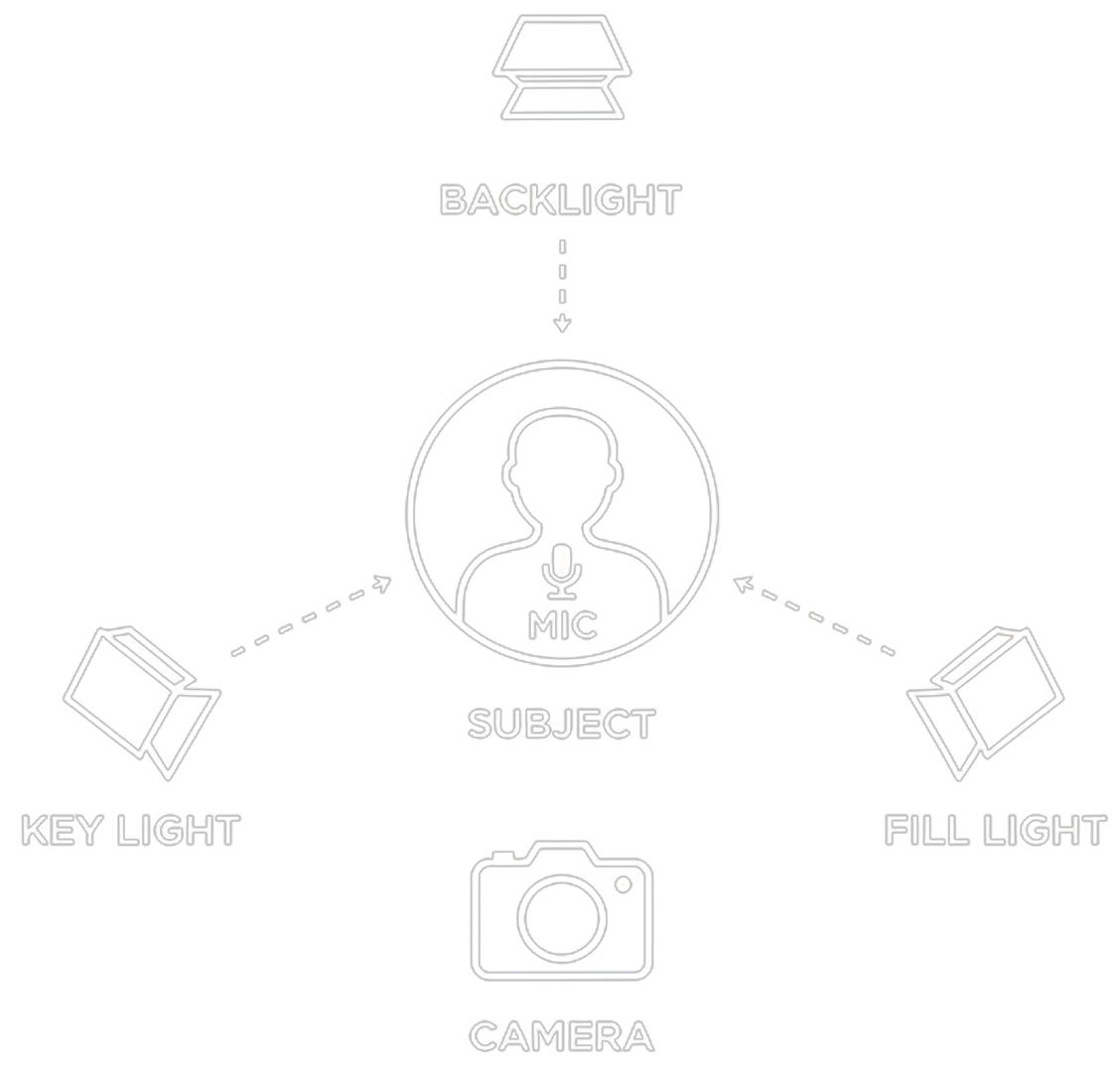
A professional audio setup includes microphones, audio recorders, headphones, cables, wind protection, and sound monitoring. For interviews, lavalier microphones and shotgun microphones are commonly used.
Poor audio can make even beautiful footage feel amateur. Viewers may tolerate a slightly imperfect image, but unclear speech is harder to forgive.
Sound should be planned before the shoot. Air-conditioning noise, traffic, echoey rooms, and nearby construction can create problems that are difficult to fix in post-production.
A professional setup includes not only equipment, but also the people who know how to use it. The crew size depends on the project’s scale, but each role exists to protect quality and efficiency.
For smaller corporate videos, one person may cover multiple roles. For larger campaigns, the crew becomes more specialised.
Post-production includes editing, colour correction, colour grading, sound design, music selection, voiceover, motion graphics, subtitles, revisions, and final exports.
Adobe notes that once filming is complete, editors organise and enhance footage, while colourists and sound engineers handle colour and audio work (Adobe). This is where the raw material becomes a finished video. Emergent’s post-production guide breaks down the final-stage elements in more detail.
This is why a professional setup includes more than shoot-day equipment. The footage must also be captured in a way that gives editors enough flexibility to finish the video properly.
The setup changes based on the goal, location, number of people on camera, creative style, and final deliverables.
There is no single “best” setup for every project. The best setup is the one that supports the concept, audience, and final channel.
Clients do not need to understand every piece of equipment, but they should ask enough questions to understand whether the production house has planned the shoot properly.
A professional video production setup is not about having the most expensive gear. It is about using the right gear, crew, and workflow for the message you need to communicate.
Before hiring a production team, look for these signals. If your team is deciding whether to keep production in-house or work with an external partner, Emergent also explains the reasons to outsource corporate video production.
When the setup is planned properly, the final video feels intentional, polished, and aligned with your brand.
Professional video production equipment usually includes cameras, lenses, lighting, microphones, audio recorders, tripods or stabilisers, monitors, power, storage, and post-production tools. The exact equipment depends on whether the project is a corporate video, event video, product video, testimonial, or campaign film.
The camera is important, but it is not the only factor. Lighting, audio, lens choice, composition, direction, and editing all affect the final quality. A video with excellent lighting and sound can feel more professional than one filmed on an expensive camera with poor setup.
Audio is important because most corporate videos rely on speech, interviews, voiceover, or explanation. If viewers cannot clearly hear the message, they are unlikely to stay engaged. Clean sound also makes the brand feel more credible and polished.
No. Some videos can be filmed with a lean crew, especially simple interviews or social content. Larger crews are useful when the project involves multiple locations, complex lighting, art direction, actors, product shots, or campaign-level production quality.
After filming, the production process should include editing, sound mixing, colour correction, colour grading, music, subtitles, graphics, revisions, and final export files. These post-production stages are what turn raw footage into a finished brand asset.
Need a professional setup for your next corporate, commercial, or brand video? Emergent Films brings together creative direction, production planning, filming, and post-production to help brands turn concepts into polished audio-visual stories. Reach the team at hello@emergentfilms.com.
The rich text element allows you to create and format headings, paragraphs, blockquotes, images, and video all in one place instead of having to add and format them individually. Just double-click and easily create content.
A rich text element can be used with static or dynamic content. For static content, just drop it into any page and begin editing. For dynamic content, add a rich text field to any collection and then connect a rich text element to that field in the settings panel. Voila!
Headings, paragraphs, blockquotes, figures, images, and figure captions can all be styled after a class is added to the rich text element using the "When inside of" nested selector system.