


A strong brand video is not created on filming day. It is created before the camera is even switched on.
If your team jumps straight into filming without a clear goal, audience, message, storyboard, schedule, and approval process, the shoot becomes expensive guesswork. Proper planning helps your video team turn your idea into a clear, polished, and useful piece of marketing content.
To plan a brand video before filming, define the video’s goal, target audience, core message, distribution channels, budget, timeline, creative direction, and required deliverables. Then prepare a script, storyboard, shot list, filming schedule, location plan, talent requirements, and approval workflow so the production team can shoot efficiently and avoid costly changes later.
This article is for marketing teams, founders, brand managers, and business leaders who want to create a brand video but need to plan the project before filming starts.
It is especially useful if your team needs to align on the goal, audience, message, deliverables, timeline, budget, and approval process before speaking to a video team or production house.
Brand video planning matters because filming is only one part of the production process. The real work begins with aligning the marketing objective, creative idea, logistics, and final deliverables before anyone arrives on set.
Adobe describes video production as a process that includes developing the concept, writing scripts, storyboarding, setting up cameras, directing scenes, editing footage, and adding graphics (Adobe). That means a brand video is not just a shoot. It is a structured project that moves from strategy to production to post-production.
For marketers, this matters because a brand video is rarely a standalone asset. It may need to work on a website, LinkedIn, Instagram, YouTube, sales decks, paid ads, and event screens. If those uses are not planned early, the final video may look good but fail in the places where it actually needs to perform.
Before speaking to a video team, define the business reason behind the video. A production house can help shape the creative execution, but your marketing team should know what the video needs to achieve.
Start with one clear objective. “We need a nice corporate video” is not enough. A better objective would be: “We need a 90-second brand video for our website homepage to explain who we are, build trust with enterprise buyers, and support our sales team before discovery calls.”
The sharper your answers are, the easier it is for the video team to recommend the right concept, crew, filming style, and production schedule.
Choose the message by asking what your audience needs to believe before they take the next step. A brand video should not try to say everything about the company.
Most brand videos become weak because they are overloaded with every service, milestone, founder quote, office shot, and product feature. The stronger approach is to build the video around one strategic message.
For example:
Once the message is clear, the production team can shape the script, visuals, interviews, art direction, pacing, and music around it.
Pre-production should prepare everything needed to make filming smooth: the concept, script, storyboard, shot list, schedule, locations, crew, talent, props, wardrobe, brand assets, and approvals.
This is where the idea becomes a production plan. Adobe’s production guide notes that planning should include a brief, storyboard, script, shot list, rehearsals, and location considerations before filming begins (Adobe). Emergent also covers the core pre-production fundamentals that help video projects move smoothly before filming starts.
Marketers should plan deliverables based on where the video will be used, not just what looks good in a master edit. A single filming day can often create multiple assets if the team plans formats in advance, especially when the video supports a wider video marketing strategy.
Wyzowl’s 2026 video marketing research found that 91% of businesses use video as a marketing tool, while social media videos and explainer videos are among the most common use cases for marketers (Wyzowl). This shows why brands should think beyond one final video and plan a content package that supports multiple channels.
If the production team knows these deliverables early, they can frame shots correctly, capture extra B-roll, record alternate lines, and plan edit versions without rebuilding the project later.
The timeline depends on complexity, but most brand videos need time for strategy, creative development, pre-production, filming, editing, feedback, and final delivery. A simple corporate video may move quickly, while a campaign video with multiple locations, talent, animation, or approvals will need more time.
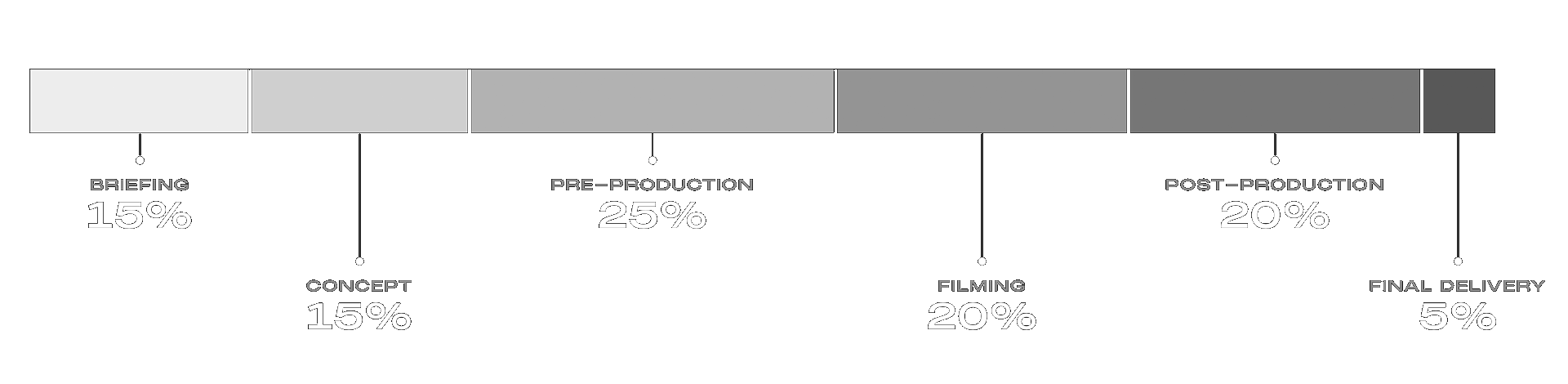
The key insight for marketers: filming is not the whole project. It is the visible middle of a much larger planning and production process.
The biggest mistake is treating the shoot as the start of the project. By filming day, the goal, concept, locations, people, schedule, and deliverables should already be clear.
If you want a better brand video, start with a better plan. The clearer your brief, the stronger the creative direction can be.
Before filming, your team should:
When planning is done well, filming becomes more focused, editing becomes smoother, and the final video becomes more useful for your marketing team.
A brand video is usually 60 to 90 seconds for a website or sales presentation, with shorter 15 to 30-second cutdowns for social media. Wyzowl’s 2026 research found that most marketers believe videos between 30 seconds and 2 minutes are most effective (Wyzowl).
A brand video communicates the company’s identity, values, story, and positioning. A corporate video may cover a wider range of business purposes, such as recruitment, internal communication, investor updates, training, or company overview content.
Yes, most brand videos need a script or at least a structured interview outline before filming. This gives the production team a clear story to capture and helps stakeholders approve the direction before shoot day.
A storyboard is useful when the video has planned scenes, visual sequences, animation, product shots, or a specific creative concept. For interview-led videos, a shot list and visual treatment may be enough, but the team should still align on the final structure before filming. For a deeper explanation, read Emergent’s guide to how storyboards amplify marketing videos.
Send your objective, target audience, key message, deadline, budget range, distribution channels, brand guidelines, reference videos, and any must-have deliverables. This helps the production house recommend a realistic concept and production approach.
Have an idea for a brand video but not sure how to plan the shoot? Emergent Films helps brands turn early ideas into structured concepts, filming plans, and polished audio-visual stories. Get in touch with the team at hello@emergentfilms.com.
The rich text element allows you to create and format headings, paragraphs, blockquotes, images, and video all in one place instead of having to add and format them individually. Just double-click and easily create content.
A rich text element can be used with static or dynamic content. For static content, just drop it into any page and begin editing. For dynamic content, add a rich text field to any collection and then connect a rich text element to that field in the settings panel. Voila!
Headings, paragraphs, blockquotes, figures, images, and figure captions can all be styled after a class is added to the rich text element using the "When inside of" nested selector system.